
 Explore
 Write
Write Chat
Chat Call
Call
OIT News
Service navigation
UT Verse TwinWave Studio
UT Verse reaches beyond text-based AI tools with TwinWave Studio, a powerful audio creation application built directly into the UT Verse platform. TwinWave Studio allows faculty and staff to generate AI-driven podcasts, create professional-quality text-to-speech (TTS) audio, edit scripts, select AI voices, and manage complete audio projects from a single workspace.
While podcast creation is one of its most obvious uses, TwinWave Studio opens the door to a variety of innovative teaching, learning, and administrative applications.
Creative Ways to Use TwinWave Studio in Higher Education
- Create audio versions of course content. Faculty can convert lecture notes, study guides, or course announcements into audio files that students can listen to while commuting, exercising, or reviewing material.
- Develop course podcasts. Instructors can create short weekly podcast episodes that highlight key concepts, discuss current events related to the discipline, or provide exam preparation tips.
- Improve accessibility. Text-to-speech tools can help make instructional materials more accessible for students who benefit from audio-based learning or prefer listening over reading.
- Build virtual guest interviews. Faculty can use AI-generated voices to simulate expert discussions, historical figures, or case study participants that bring course concepts to life.
- Support language learning. Language instructors can create listening exercises, pronunciation examples, and dialogue scenarios using multiple AI voices.
- Enhance student projects. Students can create narrated presentations, research podcasts, storytelling projects, or public-facing communications without needing professional recording equipment.
- Share campus information. Departments can produce engaging audio updates, onboarding materials, training content, or newsletters that can be consumed on demand.
TwinWave Studio demonstrates how AI can make multimedia content creation accessible to everyone. Whether you’re teaching a course, supporting students, or communicating with campus partners, TwinWave Studio provides a fast and creative way to turn ideas into professional audio experiences.
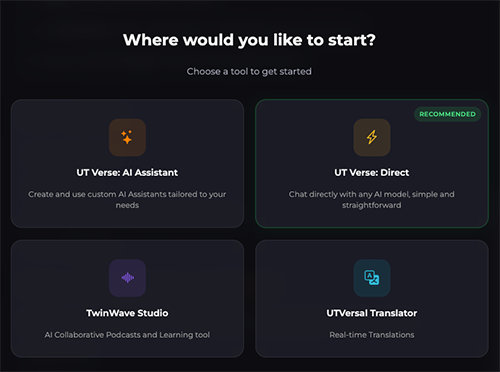
After signing in to UT Verse, select one of four tools: AI Assistant, Direct, TwinWave Studio, or UTVersal Translator.
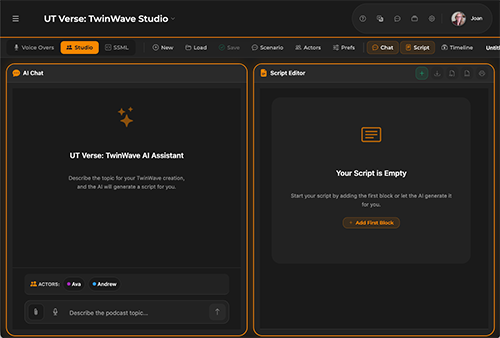
TwinWave Studio provides side-by-side windows, the Twin Wave AI Assistant, and a script editing window.
Additional Resources
Sign in to UTVerse at utverse.tennessee.edu to begin your script-writing journey.
Visit the OIT Artificial Intelligence Support pages at oit.utk.edu/ai to discover even more AI tools and support.