
 Explore
 Write
Write Chat
Chat Call
Call
OIT News
Service navigation
Using YuJa Panorama to Remediate Your Course Content
This fall semester, in each issue of OIT’s Instruction and Research Support Monthly News, we will be presenting YuJa Panorama technology tips to help faculty, instructors, and graduate teaching associates utilize the platform to remediate course materials for accessibility.
Tip 3: Understand Your Accessibility Results
Once you’ve accessed Panorama, you’ll begin seeing accessibility scores and issue summaries throughout your course. Understanding these results will help you prioritize your remediation efforts.
Accessibility Indicators (Icons): Colored icons displayed throughout Canvas that provide a visual indication of the accessibility status of course content. These icons use color and shape coding to give you a quick visual summary of the accessibility score. Refer to the icons below to understand what each color indicates:
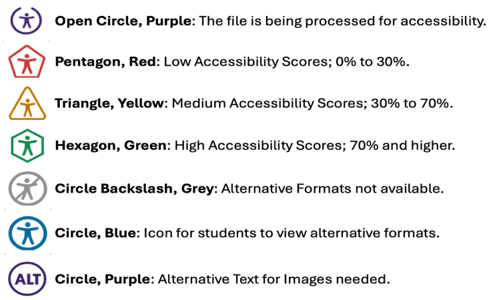
Severity Levels: Panorama groups accessibility issues into three categories based on their impact on students:
- Severe — Issues that may prevent a student from accessing course content or completing a learning activity independently.
- Major — Issues that generally allow students to continue but require additional effort or reliance on workarounds.
- Minor — Accessibility improvements that enhance usability and follow best practices but are less likely to prevent students from completing course activities.
Tip: While we recommend prioritizing issues based on their severity, all accessibility issues should be addressed over time to improve the learning experience for all students.
Read More Panorama Tips
Look for the Panorama accessibility icon indicators next to files and content in your Canvas course. Review the overall accessibility score for each Canvas site and course files. Prioritize crucial files flagged with a red icon and update them using Panorama’s remediation guidance. Start with the materials students use most frequently (syllabus, key readings, weekly modules).
Check out these Panorama tutorials for faculty:
After reviewing the tutorials in our last article (Tip 1), let’s shift focus to accessibility principles used across a few specific file types: Word, PowerPoint, PDF, and LaTeX. YuJa Panorama can assist with necessary remediation efforts for these file types, but it’s good general knowledge to always consider.
Focus first on course documents that students must read or interact with to succeed in your class.
General Principles
- Use built-in heading styles (Heading 1, Heading 2, etc.) instead of changing font size manually.
- Ensure text is actual text, not embedded in images or scanned PDFs.
- Provide a logical reading order (especially in PowerPoint).
- Avoid conveying meaning by color alone (e.g., “items in red are required” without additional indicators).
Word & PowerPoint
- Run the Accessibility Checker (Review > Check Accessibility).
- Add alt text to all images that convey information.
- Ensure tables have clear header rows and are used for data (not for layout).
PDFs
- Whenever possible, start from an accessible Word/PowerPoint document before creating a PDF.
- Avoid all scanned PDFs that are just images.
LaTeX and Equations in Canvas
Important! If you use LaTeX or include equations in your courses:
- Avoid relying solely on LaTeX-generated PDFs for essential equations or derivations, since most math in PDFs is not accessible to screen readers.
- For key formulas and worked examples, use the Canvas equation editor in the Rich Content Editor or an accessible equation tool in Word/PowerPoint, instead of pasting them in as images.
- When you do need to share a LaTeX-produced PDF, for example, a full article or notes, consider also providing:
- A Canvas page that presents the core equations in an accessible form.
- A short text explanation of the main results, so students using assistive technologies can follow the logic.