
 Explore
 Write
Write Chat
Chat Call
Call
OIT News
Service navigation
New Zoom Web Experience

Zoom is launching a fresh look for the web portal on August 26 that provides a unified, intuitive interface, making it easier to access key features and manage your account settings. Please keep in mind, your UT Zoom meetings and settings will still be available at tennessee.zoom.us; however, the look of Zoom’s web interface will change.
Want to try the fresh look now? Select the “Try new experience” toggle in the top-right corner when visiting Zoom on the web. When you switch to the new experience, a Zoom Wizard will start and help you get oriented to the new layout.
What is changing:
- A redesigned homepage with a cleaner layout.
- Product navigation: A waffle menu in the top right replaces the old left navigation panel for switching between products. After selecting the waffle icon, a menu of icons will appear, including Meetings, Chat, and Surveys. You can use the icons along the bottom to quickly launch, join, or schedule a meeting.
- Settings navigation: Select the profile icon in the top right and then “My account” to access Reports, Settings and Recordings and Transcripts. Hover over the Reports or Settings links to view an expanded menu of options.
Example of the new web experience
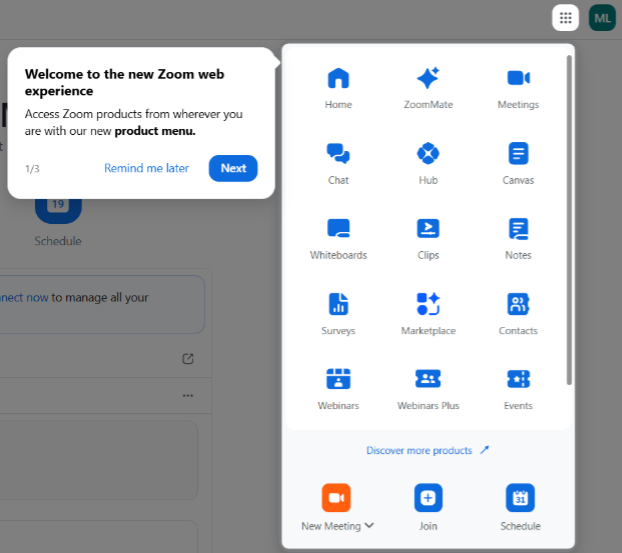
The New Zoom Wizard
For more information, review this Zoom support article on the new Zoom Web experience.