
 Explore
 Write
Write Chat
Chat Call
Call
OIT News
Service navigation
Enhancing Student Engagement with Canvas Notebook
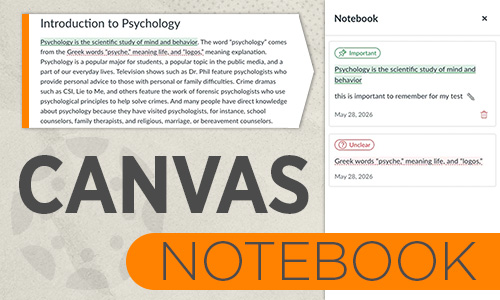
The new Notebook tool provides students with an interactive, reflective method for engaging with course content, particularly within Canvas Pages. Designed to support active reading and metacognitive learning strategies, this feature allows students to annotate and organize course material seamlessly as they navigate your course.
Key Features & Functionality
- Targeted Text Annotation: Students can highlight key text within Canvas Pages and categorize annotations as either Important (for key concepts and exam preparation) or Unclear (for concepts requiring further review or clarification during office hours).
- Contextual Note-Taking: Alongside highlighted text, students can attach personal notes to record reflections, questions, or summary points directly in context.
- Centralized Learning Hub: Accessible directly from the course navigation menu, the Notebook aggregates all saved highlights and annotations into a single dashboard. Students can filter their entries by category (Important vs. Unclear) to streamline study sessions, address gaps in understanding, and prepare for assessments.
Pedagogical Impact
By enabling students to actively mark and categorize text, the Notebook fosters self-directed learning and helps students identify areas where they may need additional support or review. As a best practice, it is not recommended to disable this tool from your Canvas course navigation menu.
To learn how students can utilize the Notebook, please visit Instructure’s How do I use the Notebook in Canvas? support documentation.