
 Explore
 Write
Write Chat
Chat Call
Call
OIT News
Service navigation
Canvas New Quizzes: Enabled By Default

Canvas New Quizzes is now enabled by default in all Canvas courses. Many instructors had already activated New Quizzes, but those who had not will now see it as an available option when creating assessments in Canvas.
Canvas Classic Quizzes remains available, and there are currently no plans to retire it. However, New Quizzes reached feature parity with Classic Quizzes in 2024, and Classic Quizzes has not received further enhancements since that time. While instructors may continue to use Classic Quizzes, new functionality will be added only to New Quizzes.
New Quizzes continues to evolve and now includes features such as streamlined quiz duplication directly from the Quizzes page, sharing quiz item banks among instructors, the ability to shuffle all questions within an assessment as well as answer choices within individual questions, and the option to require a waiting period between attempts. It also supports adding extra time accommodations for students across all New Quizzes in a course, expanded partial-credit options for additional question types, and new question formats such as Ordering and Hot Spot.
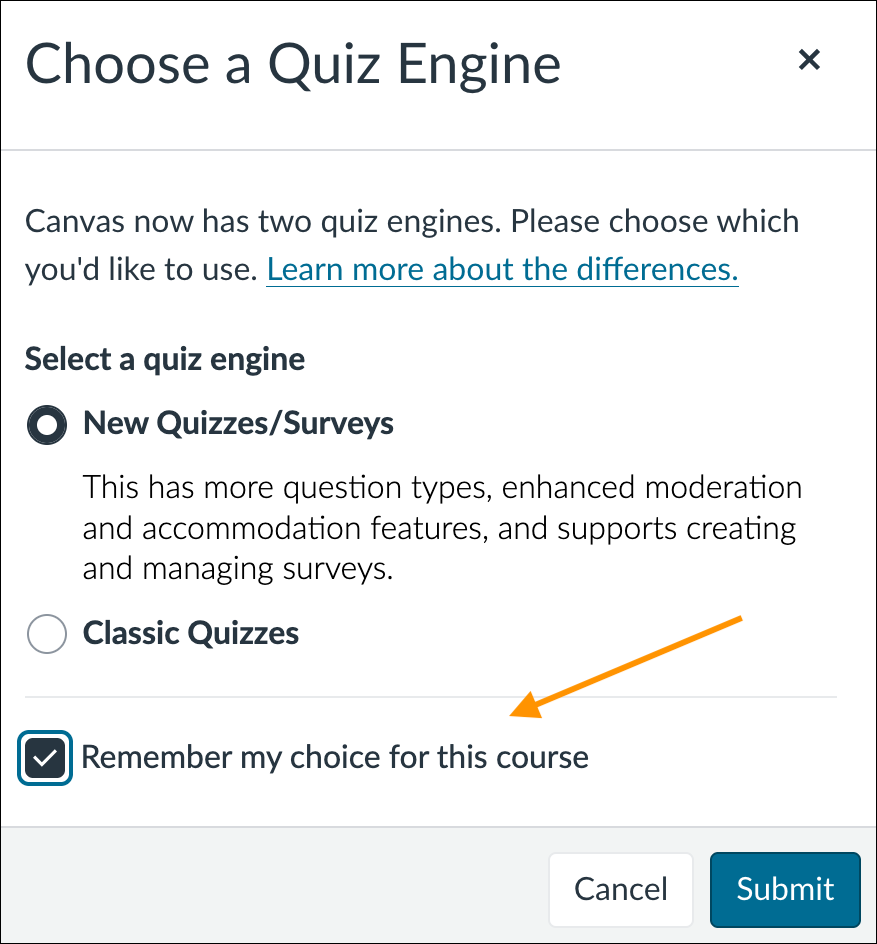
Instructors can set their quiz engine preference by selecting the Remember my choice for this course checkbox when creating a new assessment.
Please contact the Canvas Support Team if you have any questions.