
 Explore
 Write
Write Chat
Chat Call
Call
Information Security
5 Cybersecurity Habits for a Safer Campus
Service navigation
Cybersecurity is a shared responsibility. Whether you’re a student, faculty, or staff member, your daily digital habits play a critical role in protecting the University of Tennessee’s systems and data.
Here are five simple habits that can make a big difference:
1. Use Strong, Unique Passwords or a Password Manager
Reusing passwords across accounts is risky. If one site is compromised, attackers can try the same credentials elsewhere. Use long, complex passwords and consider a password manager to keep them secure.
2. Enable Multi-Factor Authentication (MFA)
MFA adds an extra layer of protection by requiring something you know (your password) and something you have (like your phone or a security key).
MFA is required for all UT services, and is highly recommended for personal accounts, as well.
3. Think Before You Click
Phishing emails are designed to trick you into clicking on malicious links or giving up sensitive information. Be cautious of urgent requests, unexpected attachments, or strange sender addresses.
Report suspicious emails in Outlook
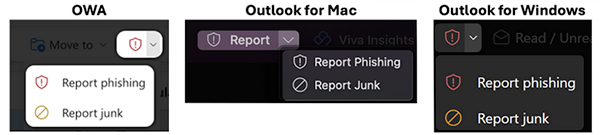
Report phishing emails from within the Outlook application by locating the report button or shield icon containing an exclamation point, then select Report Phishing. Read Phishing Article.
4. Keep Your Devices and Software Updated
Updates often include important security patches. Enable automatic updates on your operating system, browsers, and apps. Don’t ignore update prompts—they’re your first line of defense.
5. Report Incidents Promptly
If you think your account has been compromised or you clicked on something suspicious, report it right away by calling the HelpDesk at 865-974-9900 or filling out a report online.